Architecture
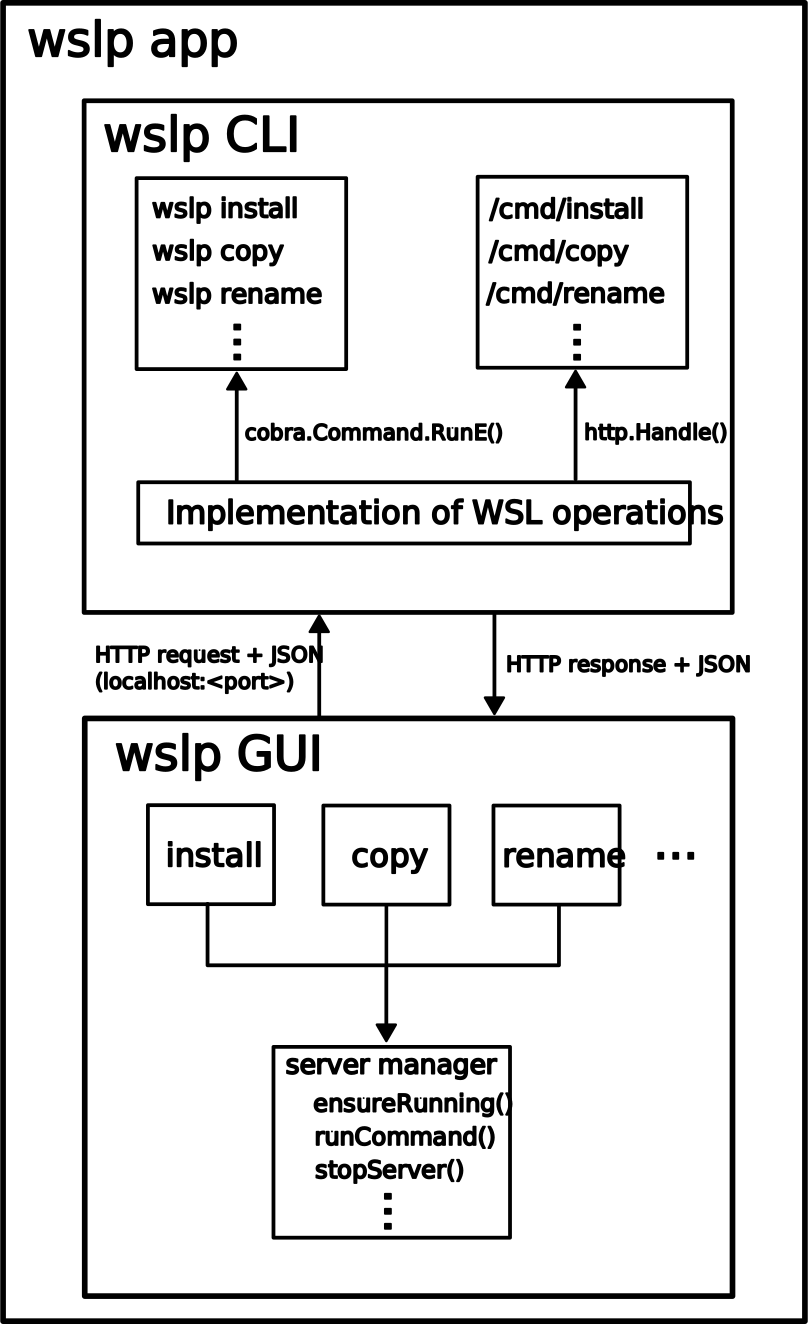
WSL Plus uses a modular architecture with three distinct layers:
Core Logic (
internal/wsl) - Platform-specific WSL operationsCLI Interface (
cmd) - Command-line interface using CobraGUI Interface (
gui) - Flutter-based graphical interface
The application supports both CLI and GUI interfaces through a flexible server-client model.
CLI Mode
In CLI mode, commands directly invoke the core WSL logic without a server:
User → CLI Command → Core Logic → gowsl | wsl.exe
GUI Mode (Client-Server)
The GUI operates as a client-server application:
User → Flutter GUI → HTTP API (localhost:8080) → Core Logic → gowsl | wsl.exe
Server Component:
Started with
wslp servecommandREST API on localhost:8080 (configurable port)
Provides multiple endpoints, e.g., list, install, unregister, default, set-default, available
Client Component:
Flutter application (Windows)
Communicates via HTTP JSON API
Real-time activity logging and progress tracking
Independent of CLI - only requires server to be running
Diagram